Review Comments (13) Screenshots (27) Questions & Answers (2/1) Votes (251) Awards (8) Wiki  
(251)
Fengtao Software Inc.
8.1.3.8
www.dvdfab.com
Shareware
56 439 people
Download DVDFab

18.62 MBDownloaded 16233 times

This software was checked for viruses Last month and was found to contain no viruses.
Click here to see antivirus report.
 
Video tutorial for DVDFab 8.1
Frame

Review

This is official description

DVDFab All-In-One is a versatile combo of all the powerful DVDFab products -- DVD Copy, DVD Ripper, Blu-ray Copy, Blu-ray Ripper, Blu-ray to DVD Converter, 2D to 3D Converter, Blu-ray 3D Ripper, Video Converter, and File Transfe
DVDFab is a software utility that provides a comprehensive set of tools.
 
The following review written by one of the Software Informer contributors applies to version 8.0

DVDFab is a software utility that provides a comprehensive set of tools to carry out a wide variety of DVD- and Blu-ray-related tasks, such as copying, ripping, and converting videos. Thanks to DVDFab, you can now make backups of your entire movie collection, regardless of any region restriction or copy protection scheme used.

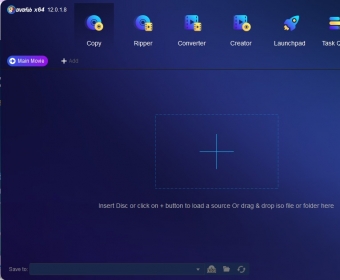
DVDFab shows a panel that provides easy access to all the functions it offers, divided into various categories. The "DVD Copy" category, for example, includes such tools as "Full Disc", to make an entire copy of a disc onto a blank one; "Main Movie" automatically extracts only the movie itself, getting rid of additional elements such as trailers or documentaries; "Split" divides the original video or movie into smaller parts, while "Customize" allows you to select only those DVD elements you would like to extract.

The "DVD Ripper" section allows you to extract the contents of a DVD and re-encode it into any of the most popular compression formats - very useful for making backups of your movies while saving a lot of disk space. Those formats include iPhone, iPad, PSP, Xbox 360, PS3, AVI, MPG, MP4, 3GP, and many others. The next category is "Blu-ray Copy" with a similar functionality to that in "DVD Copy", but obviously oriented to the Blu-ray technology. Here you will find a tool designed to convert an existing folder containing a Blu-ray structure into an ISO image. "Blu-Ray Ripper" allows you to make exactly the same thing as "DVD Ripper" does, but with Blu-ray discs. However, the latest versions of DVDFab include a very novel feature, "Blu-ray 3D Ripper", which provides similar features as those in the previous tool, but for 3D movies.

Finally, you have "Blu-ray to DVD" and "Video Converter", which basically allow you to convert an existing video folder or file into any of the popular formats mentioned above. It is very important to know that for all the described tools, DVDFab allows you to choose the source disc, folder or file, and the destination folder and format. In addition, you are also allowed to make DVD and Blu-ray copy and rip tasks not only from physical discs, but also from disk folders that contains the corresponding disc structure and from disc image files (such as ISO, IMG, and NRG files).

The trial version of DVDFab allows you to test the whole set of DVD and Blu-ray tools, and you can try them for 30 days. However, if you are interested in buying it, the website offers all those tools separately and individually priced. Of course, there is also the all-in-one option, but it might be a bit expensive for some people. Besides, you may choose to buy a license for a specific number of years or a lifetime license, but, of course, this last option is even more expensive.
  • Easy to use.
  • Offers a very comprehensive set of tools.
  • Allows you to copy or rip 3D movies.
  • Allows you to work not only from physical discs but also from hard disk folders.
  • Allows you to make backups of your movies regardless of region restrictions or copy protections.
  • 30-day trial.
  • It may look a bit expensive.

Reviewed by: Ricardo Soria

Reviewer rating:

Reviewed: 7 months ago

What's new in version 8.0

June 8, 2011
DVDFab 8.0.9.8 Qt Updated!
New: Added support for Intel Quick Sync as H.264 decoder and encoder. It works on DVD Ripper, Blu-ray Copy, Blu-ray Ripper, Blu-ray 3D Ripper, Blu-ray to DVD Converter, Video Converter and 2D to 3D Converter.
New: Brand new profile design, which is very flexible and powerful. A new profile editor will be out soon, please wait.
New: Brand new MP4 muxer.
New: Added new splash window at startup.
New: Added option "Disable all GPU codecs for decoding and encoding" when user wants all software codecs.
New: Added option "Open output directory when done".
New: Updated language files.
New: Some minor changes and improvements.
Fix: Several crash problems in certain cases.

DVD Copy:
New: Added support for a new copy protection as found on "True Grit" (US).
Fix: A writable media detection problem in v8092.

Blu-ray Copy:
New: Added support for AACS MKB v25.
Fix: A crash problem when opening certain discs.
Fix: A writable media detection problem in v8092.

Blu-ray 3D Ripper:
New: Added "Base View" info, normally it's "Left" eye, but for some movies it's "Right" eye.

What's new in version 7.0

June 8, 2010
DVDFab 7.0.7.0 Updated!
New: Updated language files.
New: Added "/NOIMAGEDETAILS" for ImgBurn to stop the program from displaying details about the image.
DVDFab "DVD to DVD":
New: Added support for a new copy protection as found on "Shutter Island".
Fix: More than 6 ISO sources can be opened, now the limit is 64.
DVDFab "DVD to Mobile":
New: Added support for Apple iPhone 4.
DVDFab "Blu-ray to Blu-ray":
New: Added support for Blu-ray 3D.
New: Added "Remove HD Audio" commandline support for "Full Disc" mode.
Fix: More than 6 ISO sources can be opened, now the limit is 64.
Fix: "Write Data" now writes root folder instead of "BDMV" sub-folder.
DVDFab "Blu-ray to Mobile":
New: Added support for Apple iPhone 4.
Fix: A problem that some subpictures of Avatar cannot be renderred.
Fix: A probelm that AVI output may be truncated.
DVDFab "File to Mobile":
New: Added support for Apple iPhone 4.
Report a wrong version Report a wrong program title Suggest a correction

Screenshots

Main window Main window Welcome Screen Welcome Screen DVD Copy - Full Disc DVD Copy - Full Disc DVD Copy - Main Movie DVD Copy - Main Movie
All 27 screenshots

Latest comments

Guest #15208015(beginner) Last year 
A great program.
Works like a charm.
Has plenty of options
Reply
Guest #6548925(beginner) Last year 
why does the writing data stop working
Reply
mrluckyman(beginner) 2 years ago 
I agreed with Trent Terrill. it is fastest ripper software i've used. i love using this so if u want to copy dvd from Redbox then use it so you can copy full disc which included subtitles, menu, etc... just the way original is or if you want just movie and subtitle then make sure to click main movie only and click subpicture if u need subtitles. you must have subtitle optional on your remote otherwise u might won't see subtitles. i suggest full disc so if more than 4.7 gb then it will be shrink and lose something like special features/extra.
Reply
Add new comment All 13 comments

E-mail Address:

Password:

Register now »

Forgot password?

Sign in with:
Download Software Informer Client
Programs For Ripping Your DVD Collection
I am a proud owner of a SMART Samsung TV. I love it so much, especially the fact that it...
All articles
Copyright © 2012, Informer Technologies, Inc. About| Privacy and terms| Help| Feedback & Support| Partners program